
Send Submissions to a webhook and retry what your receiver missed
Add a webhook endpoint to a Form, verify the signature on your receiver, and use Retry failed deliveries after an outage. What FormFlow retries by itself, and what it will not resend.
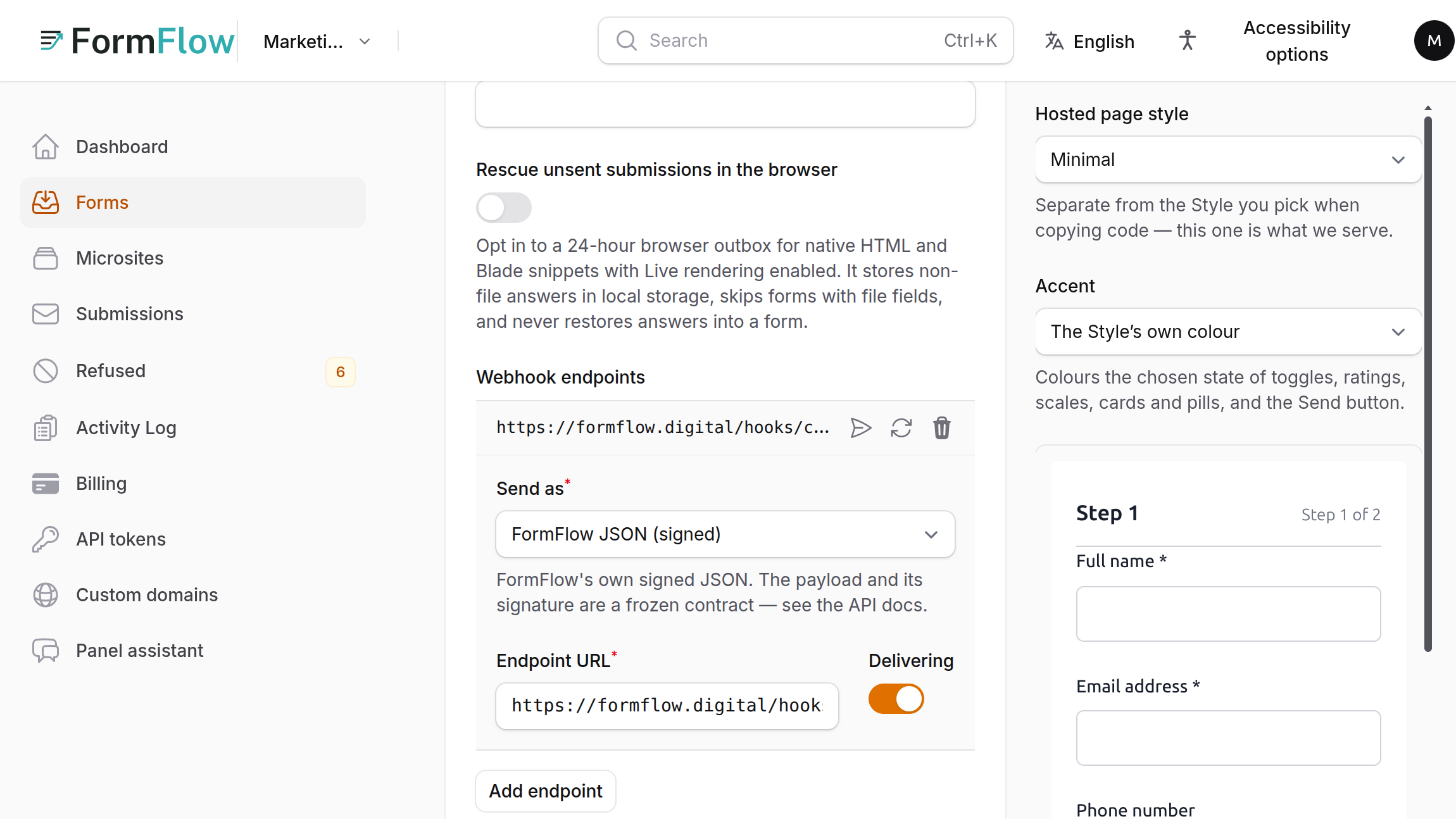
A webhook sends each accepted Submission to a URL you own, within seconds, so a lead can land in your CRM or your own code without waiting for an email digest. Webhooks have been part of FormFlow since v1.0.0. This tutorial adds an endpoint, shows what your receiver gets and how to check it, and then covers the part that matters on the day your receiver is down: what FormFlow retries by itself and how to resend the rest with Retry failed deliveries.
What you need
A receiver you control that accepts a POST with a JSON body. Its address must be https and must resolve only to public addresses. The panel refuses anything else when you save, so a localhost address does not work, and a tunnel is the usual way to test.
Add the endpoint
Open the Form in the panel and go to the Delivery tab.
Under Webhook endpoints, press Add endpoint.
Leave Send as on FormFlow JSON (signed). The other choice, Slack message, takes a Slack incoming webhook URL.
Paste your receiver's address into Endpoint URL and leave Delivering on.
Save the Form. A notification titled Copy your webhook signing secrets now shows the URL and the secret of each new endpoint. It stays on screen until you dismiss it, and it says the secrets are not shown again. Store the secret in your secret manager. To get a new one, delete and re-add the endpoint.
Press Send test on the endpoint's row. You get Test delivered, or Test delivery failed with your receiver's own error text. The row has to be saved first, and the button is limited to 20 test deliveries an hour.
Then send a real Submission and open it in the panel. Its Delivery intents table lists each destination owed that Submission, with a status of Pending, Leased, Delivered or Dead, the number of attempts, the Delivery ID and the last error.
What your receiver gets
One POST per Submission that is not spam. The body is a small JSON document, and three headers come with it. This is the shape, with placeholder values:
{
  "id": "SUBMISSION_UUID",
  "form": { "id": "FORM_UUID", "name": "Contact Us" },
  "submitted_at": "2026-10-08T09:00:00+00:00",
  "data": { "name": "Ada Lovelace", "email": "ada@example.com" }
}
X-FormFlow-Timestamp is the time of the attempt, in seconds.
X-FormFlow-Signature-256 is sha256= followed by an HMAC-SHA256 of the timestamp, a dot and the raw body, keyed with the endpoint's secret.
X-FormFlow-Delivery-Id identifies the delivery. It stays the same on every retry.
Verify the signature before you trust a request, over the raw body and not a re-encoded copy. A PHP version, in the form FormFlow's API documentation gives it:
function formflow_verify(string $rawBody, string $timestamp, string $signature, string $secret): bool
{
    if (abs(time() - (int) $timestamp) > 300) {
        return false;
    }

    $expected = 'sha256=' . hash_hmac('sha256', $timestamp . '.' . $rawBody, $secret);

    return hash_equals($expected, $signature);
}What FormFlow retries by itself
FormFlow waits up to 10 seconds for an answer. Any 2xx response counts as delivered. A timeout, a dropped connection, a 408, a 429 or a 5xx response is retried, for up to six attempts in all, with waits of 10 seconds, 1 minute, 5 minutes, 30 minutes and 2 hours between them. Any other answer, including a 3xx or a 4xx, is treated as a permanent refusal and is not retried automatically. FormFlow does not follow redirects, so an endpoint that answers with a redirect counts as failed. Point the endpoint at its final address.
If an endpoint keeps asking to be retried and runs out of attempts, FormFlow switches Delivering off for it and tells the Team's owners by email. A delivery that has run out is shown as Dead. The dashboard also keeps listing a webhook whose forwarding is off, with its failure streak, until a delivery succeeds.
Retry what your receiver missed
Before v1.33, each missed Submission needed its own Retry now. Now one press covers an endpoint. The Release is in the Changelog. The order matters:
Fix the receiver first. Each failed delivery gets one more attempt, so a retry against a receiver that is still broken only fails again.
On the Delivery tab, check the endpoint's Delivering switch. If FormFlow switched it off, turn it on and save the Form. Retrying a switched-off endpoint is refused with "Turn Delivering on and save the form, then retry."
Press Retry failed deliveries on the endpoint's row and confirm. The dialog says every failed delivery that can still be sent is queued again, with its original delivery ID and payload.
A notification tells you how many were queued. One press queues at most 500. If more remain, it says to press again.
Open a Submission and check its Delivery intents table. The attempt count has gone up and the status should reach Delivered.
If you change an endpoint's URL, secret or format, it starts afresh. Deliveries made before the change are not resent, and from v1.35.1 the dashboard no longer counts the old failures against the new address. Switching an endpoint off and on without changing it keeps its failure record.
Limits to know about
A new endpoint receives only Submissions that arrive after it is set up. It is not sent the ones you already have.
Spam is not forwarded.
Retry failed deliveries resends only deliveries that can still be sent, and only to the endpoint as it is now.
Delivery is at least once. Your receiver must tolerate a repeat.