
v1.11: close a Form at a set time or after a number of Submissions
Release v1.11.0 lets a Form close itself at a UTC time, after a number of Submissions, or both. How the rules count, and what a closed Form does.
Until Release v1.11.0 on 30 September 2026, the only way to stop a Form taking Submissions was to switch it off yourself. Now it can close itself: at a time you choose, after a number of Submissions, or whichever of the two comes first. The Changelog entry gives the short version. This post explains how the rules count, how to set them and where they are blunt.
The two rules
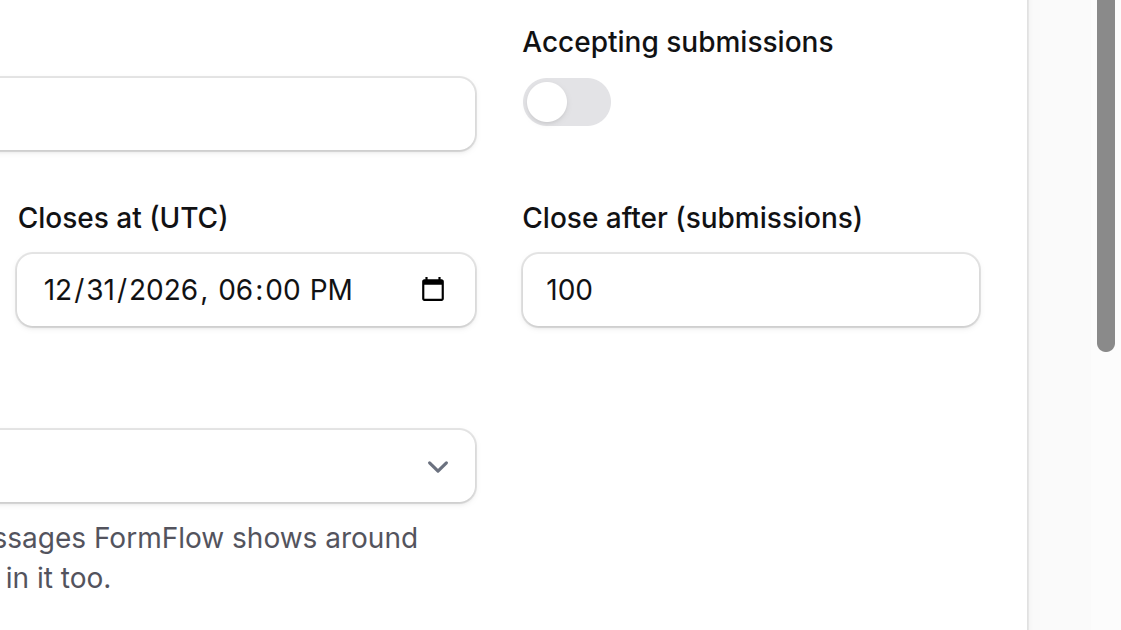
In the Form editor, beside the Accepting submissions switch, there are two new fields. Together they are the Form's closing rules, and each is optional.
Closes at (UTC) is a date and time, to the minute. The Form closes when that moment passes. It is always UTC, whatever timezone your panel uses, and the helper under the field shows what the time is in yours.
Close after (submissions) is a whole number of at least 1. The Form closes once it holds that many Submissions.
Set both and the first one reached closes the Form. Neither touches the switch. A Form closed by a rule behaves exactly as if you had turned the switch off, and the switch itself stays on.
What the number counts
The cap counts the non-spam Submissions the Form holds right now. It does not count per billing period, and spam never counts toward it. That has two consequences you should plan for.
Deleting Submissions makes room. If a Form closed at 100 and you delete ten, it opens again for ten more.
The cap is soft. Submissions that arrive at the same instant are each counted before either is stored, so a few can land past the number.
If you need exactly 100 and no more, treat the cap as a guard rail and check the count afterwards.
Setting them
Open the Form in the panel and find the Accepting submissions switch at the top of the editor.
Pick a time in Closes at (UTC), enter a number in Close after (submissions), or do both.
Read the note under the switch. While the Form is open it says when it will close and how many Submissions it holds so far, for example "Closes after 100 submissions (37 so far)."
Save.
What a closed Form does
Once a rule is met, every Submission posted to the Form's endpoint is turned away with a 403 and recorded in Refused, where you can see it. If the Form has a Hosted page, that page shows the closed notice instead of the fields. The note under the switch changes too: it says which rule closed the Form, that its closing time has passed or that it holds as many Submissions as its cap allows.
To reopen it, clear the rule, raise the number or delete some Submissions. Nothing else needs undoing.
Where it is blunt
UTC only. There is no per-Form timezone, so convert the closing time yourself.
A Submitter cannot tell which rule closed the Form. The closed notice is the same whichever one it was.
The cap is a limit on what the Form holds, not on what it ever received. It is not a quota.