
v1.1: describe a Form, branch it, and accept documents
Release v1.1.0 adds a Form built from one sentence, branching Steps, six field types and scanned document uploads. What each needs, and where it stops.
Release v1.1.0 shipped on 12 September 2026 with five changes: a Form described in one sentence, branching, six new field types, document uploads, and clearer problem messages in the builder. The Changelog entry gives each a line. This post covers what each one needs, how to use it and where it stops.
Describe a Form in one sentence
On a paid plan, the new-Form page shows a Describe your form button while the builder is still empty. Write what the Form collects, or the test you want to set, in up to 1,000 characters. FormFlow asks an AI model for the fields and puts them in the builder. Nothing is saved until you review them and create the Form.
Before you rely on it, know its limits:
It is a guess from one sentence. Read every field, label and option before you create the Form.
The result is whole or nothing. If any field comes back in a shape the builder does not accept, you get no Form, and the attempt still counts.
Each Team gets 20 attempts a day, and one attempt keeps at most 30 fields. At the limit you are asked to try again tomorrow. If the AI service is busy, you are asked to try again in a moment.
The button only appears on an empty builder. It starts a Form; it does not rewrite one.
If you describe a quiz, the Form can arrive with an answer key, a mark for each question, a pass mark and the choice to show the answers afterwards. The model is told to key only a question with exactly one right answer and to leave every field that collects information unkeyed, so check the key as carefully as the questions.
Branching
A branch sends a Submitter to a different Step depending on one answer. On a select or radio field, open Where it leads and press Add a branch. Under When the answer is, pick one of the field's options. Under Go to, pick a later Step or the end of the Form. An answer with no branch continues to the next Step.
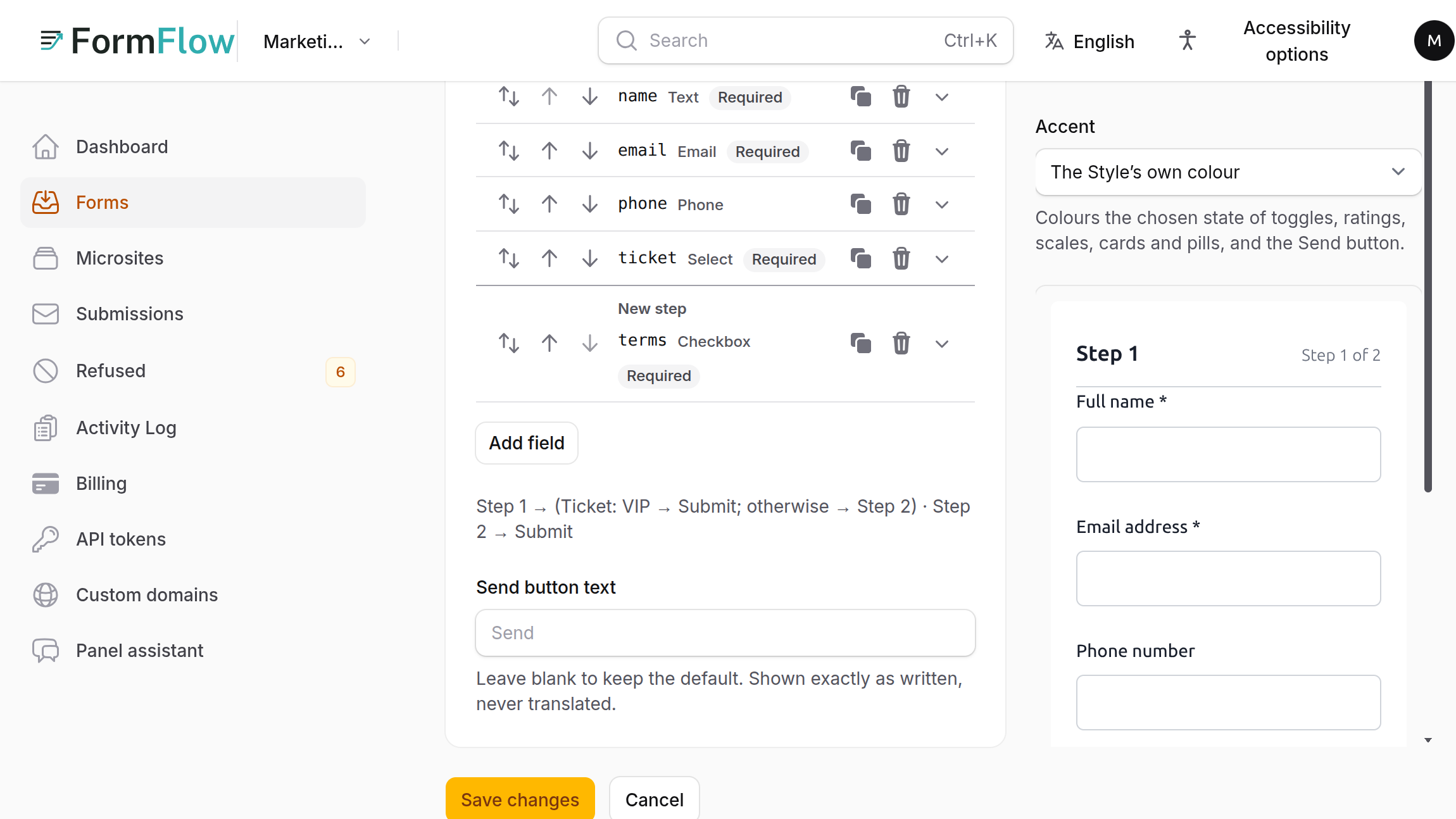
Under the fields the editor draws a route map, one line per Step, for example Step 1, then Ticket: VIP goes to Submit, otherwise Step 2. Read it after every change; it is the fastest way to see where each answer leads.
Only a select or radio field can branch, and only one field on a Step.
Branches only move forward, so a Form cannot loop.
A Form with an answer key cannot branch. People who answer a graded paper differently have no single total to mark against.
Branching belongs to multi-step Forms, which need a paid plan.
FormFlow works out the route from the answers it receives, and drops any value sent for a Step the route never reached.
Six new field types
The builder now offers scale, rating, time, duration, grid and checkbox grid. A scale runs from 0 or 1 to at most 10, with an optional caption of up to 40 characters at each end. A rating is stars, from 1 to between 3 and 10. A grid takes one question per row and one answer per column, up to 20 rows and 10 columns. The Changelog says they work everywhere a Form can be shown.
Document uploads
A file field accepted images only. It can now also accept PDF, Word (.docx) and Excel (.xlsx) files, but you opt in by ticking each document type on the field. Left empty, it accepts the image formats as before (JPEG, PNG, WebP and GIF; SVG is excluded). A field takes at most 20 files.
FormFlow checks a file's type by its content, not its name. Older binary Office files, macro-enabled files and archives are not accepted.
Every document is scanned for malware before it is stored. An infected file is refused with one fixed sentence; the scanner's own signature name goes to FormFlow's log, not to the Submitter.
If the scanner cannot answer, a document is refused with the message that documents cannot be accepted right now. It is never stored unscanned.
Uploads need a paid plan, and each plan has its own per-file size ceiling. The free plan accepts none.
Form problems name the row
When the builder finds a problem with a Form, it now names the exact row of the field at fault, in all nine panel languages. You no longer have to hunt through a long Form for the field a message means.